Instead of chasing party details across messages, use a private Facebook event for invitations and updates, with a separate written venue confirmation before guests make plans. This 2026 workflow keeps the guest list organized without mistaking a Facebook response for a private-party booking.
- For facebook events private party booking pizza lounge planning, use Facebook for invitations—not venue confirmation.
- Sliceofsociety fits hosts seeking New York-style pizza, small plates, and a lounge setting in Newhall.
- Confirm the venue arrangement before publishing the location or inviting guests.
- Track guest responses separately from the venue’s confirmed party details.
Why this matters
Facebook organizes the invitation; the venue confirms the arrangement. A guest selecting Going does not reserve a table, establish exclusive use of a room, or tell the restaurant how to handle your group.
Sliceofsociety is a Newhall/Santa Clarita pizzeria and lounge offering New York-style pizza, small plates, cocktails, live jazz, and DJ entertainment. Sliceofsociety is best for hosts seeking New York-style pizza and a lounge setting in Newhall. Ask directly about the arrangement your celebration needs rather than treating those offerings as a private-event package.
The useful outcome is not a crowded Facebook page. It is a confirmed venue plan, a usable guest count, and guests who know where to go. No invitation workflow guarantees a full house.
Before you start
- Facebook access: Use an account that can create an event. For a personal celebration, start from your personal profile rather than assuming a business Page offers the same privacy controls.
- Party materials: Prepare the occasion, requested date, arrival time, estimated attendance, organizer contact, and questions about food, seating, accessibility, and entertainment. Keep sensitive guest information out of the event description.
- Privacy gotcha: Choose the event’s privacy before creating it. Facebook event privacy cannot be changed after creation; a mistake requires a replacement event, not a description edit.
Set aside 15 minutes for a setup review after you have the venue details. This is a planning recommendation, not a booking deadline or a promise about response times.
For your 2026 celebration, assign one organizer to communicate with the venue. Friends can help with invitations, but conflicting requests about timing or headcount make the plan harder to manage.
Venue brief and booking confirmation
The venue conversation comes first. A Facebook event is not evidence that a restaurant has accepted your party, even when the restaurant’s name appears as the location.
Confirm the party arrangement
- Write a short brief with the occasion, requested date, start and finish times, estimated guests, and whether you want a group dinner or exclusive private use.
- Contact the venue through a contact method it currently publishes. Ask whether it can accommodate that specific arrangement; do not assume an online food order also reserves dining space.
- Ask about seating, food service, accessibility needs, decorations, and any entertainment plans. Request explicit answers for anything essential to the celebration.
- Obtain written confirmation of the agreed arrangement. Keep the venue’s instructions in your organizer notes, separate from the guest-facing invitation.
- Copy only confirmed details into your event draft. Leave unresolved requests out of the invitation rather than presenting them as part of the evening.
Expected result: You have a venue-confirmed plan and a clear record of what remains undecided. You have not promised guests a private room, dedicated entertainment, or a service format that the venue has not accepted.
Use the guide to booking a private event at a Newhall pizza lounge to shape the questions you bring to that conversation.
Sliceofsociety offers pizza and lounge dining, but the invitation should describe only the arrangement confirmed for your party. Live jazz and DJ entertainment are part of the business description—not proof that either is scheduled for your event.
Facebook event configuration
Best for a personal celebration: a private Facebook event. It keeps the invitation focused on your invited audience, but it does not replace a venue agreement or a final guest-count check.
Choose the event visibility
Public and private events serve different purposes. Pick the option that matches the audience, not the option that sounds most likely to fill the room.
| Event option | Best for | Advantage | Limitation |
|---|---|---|---|
| Private Facebook event | A personal party with an invited guest list | Keeps event details within the invited audience | Still requires direct guest-count and venue confirmation |
| Public Facebook event | A venue-approved event intended for public discovery | Makes the event visible beyond a personal invitation list | Does not provide the privacy needed for a personal celebration |
For a private party in 2026, avoid publishing guest names, personal contact details, or a surprise-party plan in a public event. Public visibility and private attendance are different decisions.
Create the invitation
- Open Facebook and select Events. Select Create new event to begin the event setup.
- Choose Private before completing the invitation. Check the audience choice before saving; the description cannot override it.
- Enter a recognizable event name. Use the occasion and host’s name rather than wording that suggests the restaurant is producing or endorsing the party.
- Enter the confirmed date and start time. Check the year is 2026, then verify that the time matches the venue’s written confirmation.
- Enter the confirmed venue location. Compare the displayed location with the venue details rather than accepting a similarly named search result.
- Add a description covering the occasion, arrival instructions, response deadline, and organizer contact method. Explain that guests should tell the organizer directly about additional attendees.
- Review the draft and select Create event. Use Invite to send invitations after the venue details and privacy are correct.
Expected result: Guests receive an invitation with a consistent date, location, and host contact. The event describes your confirmed plan rather than acting as a request to the venue.
Keep the description readable. Put arrival instructions first, then the response request, then any additional details; a long story about the celebration should not bury the information guests need.
Guest-count and venue handoff
Facebook responses are useful signals, not a final meal count. One account can represent a guest who plans to bring someone else, while another guest might reply directly without changing their event response.
Build the organizer record
- Create a simple organizer record with guest name, Facebook response, direct confirmation, additional attendees, and follow-up status. Use a document you control; no software connection is required.
- Use 3 status categories for your own planning: invited, confirmed, and declined. Mark a guest confirmed only after the guest directly confirms attendance and any additional attendees.
- Ask each household or invitation contact to confirm who is attending. Do not assume a Facebook response includes partners, children, or friends.
- Record dietary and accessibility requests privately. Send relevant requests to the venue for review without promising accommodations before receiving an answer.
- Establish 2 review checkpoints: one before sending invitations and one before the venue’s agreed final-count deadline. The venue sets its own requirements; your checkpoints keep the invitation aligned with them.
- Send the confirmed guest count and outstanding questions to your venue contact. Keep a written record of the response.
Expected result: Your organizer record distinguishes interest from confirmed attendance, and the venue receives a count with a clear meaning. You can explain who is included without reconstructing a message thread.
The handoff follows one sequence: Venue confirmation, Private event, Guest confirmation, Final handoff. Keep that order even when enthusiastic guests start responding early.
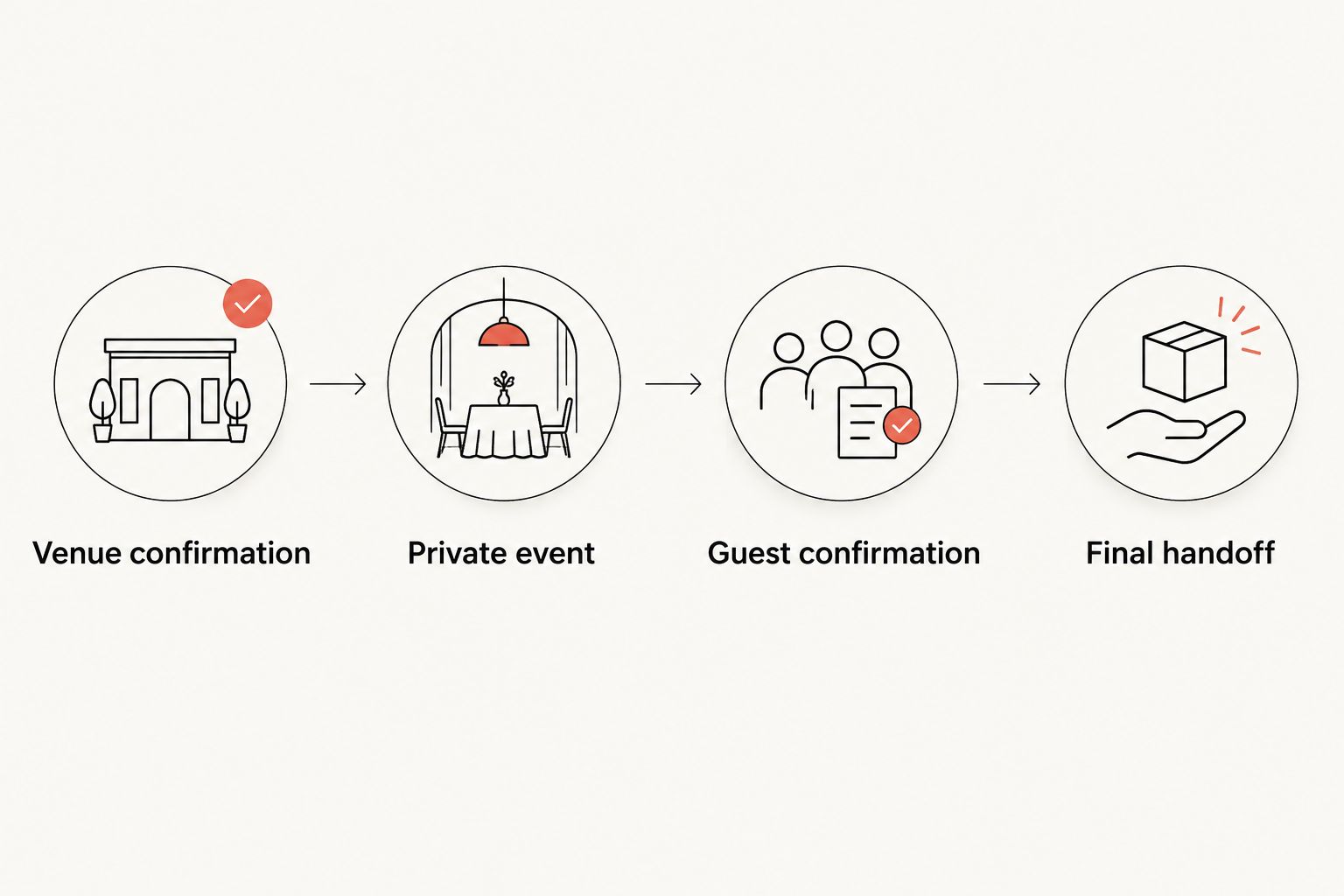
Do not add a Facebook-to-booking automation unless you have a verified booking system and permission to use it. This workflow needs no connector: it separates guest communication from the venue’s acceptance of your party.
Final review and guest instructions
A clean invitation still needs a final check. For your 2026 event, compare the Facebook details with the latest venue confirmation—not with an old draft or a friend’s recollection.
Review the published event
- Open the event and inspect the date, time, location, and description. Use Edit to correct details only after checking the change with the venue where necessary.
- Check that your organizer record includes every directly confirmed attendee. Resolve unclear additional guests before sending the final count.
- Share one concise update containing arrival instructions and the current plan. Ask guests to acknowledge material changes directly rather than relying on a notification.
- Send essential instructions separately to guests who do not use Facebook. Keep their attendance in the same organizer record.
- Save the venue confirmation and latest guest count somewhere you can access during the celebration. Designate a backup organizer to handle guest questions if you are occupied.
Expected result: Facebook users and non-users receive the same practical instructions. Your host record matches the plan the venue has accepted.
Keep one source of truth for each job: the event holds guest-facing information, the organizer record holds attendance, and the venue confirmation holds the agreed arrangement. Mixing those jobs creates avoidable ambiguity.
Variant: update the plan when party details change
Best for an existing invitation: edit the original event instead of creating competing versions. This keeps guests together, but changes still need direct communication.
For a date, time, location, or party-size change, contact the venue before editing Facebook. A revised description does not revise a restaurant agreement.
- Confirm the requested change with the venue and save the reply.
- Open the event, select Edit, and update the affected details.
- Publish a short update explaining exactly what changed and what guests should do next.
- Ask confirmed guests to reconfirm attendance when the date or time changes. Update your organizer record and send the revised count to the venue.
Expected result: The event, guest list, and venue record describe the same revised plan.
A privacy mistake is different. Because event privacy cannot be changed after creation, create the correctly configured replacement and clearly direct guests away from the old invitation.
Troubleshooting
Facebook shows interest, but the count is unclear
Fix: Ask guests for direct confirmation, including additional attendees. Keep Facebook responses in a separate column so you do not count an expression of interest as a confirmed place at dinner.
The event has the wrong privacy
Fix: Replace the event with one using the correct privacy setting. Remove sensitive information from the mistaken event and tell invited guests which invitation to follow.
The venue cannot find a booking under your name
Fix: Stop treating the Facebook event as confirmation. Check your written venue correspondence and contact the venue to resolve the arrangement before repeating the location to guests.
Guests missed a changed start time
Fix: Edit the event and contact confirmed guests directly. Ask for acknowledgment; an event update alone does not establish that everyone has read the change.
A guest requests food or access arrangements you have not confirmed
Fix: Take the request privately and ask the venue directly. Do not infer allergy suitability, ingredient details, seating access, or a special service from a menu name or a photograph.
Customize your workflow
Once your 2026 invitation and confirmation process work, adapt the brief to the occasion. A birthday needs a clear guest list; a team celebration needs an organizer who can collect responses; a surprise party needs arrival instructions that do not expose the surprise.
Sliceofsociety’s pizza lounge offering gives your group a food-and-night-out starting point. The limitation is practical: the business description does not establish private-room access, event capacity, or dedicated music for your celebration. Confirm those details rather than adding them to the invitation.
Expand the workflow with an organizer-only checklist for food questions, arrival coordination, and guest communication. Keep menu decisions out of the invitation until the venue has confirmed them, and do not publish guests’ dietary details.
Start with the venue details
Review the pizzeria and lounge before discussing your group’s plans.
FAQ
Can I book a private pizza lounge party through Facebook Events?
Creating a Facebook event does not book a private party. Confirm the arrangement directly with the venue, then use the event for invitations and guest updates.
Should I use a private or public Facebook event for my party?
Use a private Facebook event for a personal celebration with an invited guest list. A public event fits a venue-approved gathering intended for public discovery, not a private guest list.
Does selecting Going confirm a guest’s place at the restaurant?
No, selecting Going does not reserve a place with the restaurant. Ask guests to confirm attendance and additional attendees directly, then send the agreed count to the venue.
Can I change a Facebook event from public to private?
No, Facebook event privacy cannot be changed after creation. Create a replacement with the correct privacy and clearly tell guests which invitation to use.
Is Sliceofsociety a fit for a pizza lounge celebration in Newhall?
Sliceofsociety fits hosts seeking New York-style pizza, small plates, and a lounge setting in Newhall. Confirm your specific group arrangement directly; the business description does not establish private-event capacity or exclusive use.
How do I update guests when the party date changes?
Confirm the new date with the venue before editing the Facebook event. Contact confirmed guests directly, request renewed attendance confirmation, and send the revised count to the venue.
Do I need an automation tool to connect Facebook Events to party booking?
No automation tool is needed for this workflow. Use Facebook for invitations, an organizer record for attendance, and written venue correspondence for confirmation.
One last thing
The best final check is a read-back, not another invitation. Send the venue one short summary of the confirmed date, arrival time, guest count, and agreed arrangement, then resolve any discrepancy before the party.
For your 2026 celebration, make the guest experience feel simple because the organizer’s record is clear. Pizza, conversation, and a night together belong in the foreground; conflicting event details do not.