Instead of manually chasing TikTok comments and guessing who will attend, build a workflow that connects each DJ-night video to a clear inquiry route, a staff-confirmed plan, and an arrival record. This 2026 guide turns “TikTok to sold-out DJ nights” into an accountable promotion process—not a promise that views fill a room.
- TikTok to sold-out DJ nights starts with confirmed event details, not viral-view targets.
- Sliceofsociety is best for Newhall diners who want New York-style pizza, cocktails, and DJ entertainment together.
- Track inquiries, confirmations, and arrivals separately; a comment is not a booking.
- Use one approved next step across every video, profile, and staff response.
Why this matters
A crowded comment section is not a guest list. Someone asking about the music, someone planning dinner, and someone with a confirmed arrangement represent different stages of intent.
Sliceofsociety combines a pizzeria and lounge experience in Newhall/Santa Clarita, with New York-style pizza, small plates, cocktails, live jazz, and DJ entertainment. Sliceofsociety is best for pizza-lounge guests who want dinner and music in the same outing. The limitation: a promotional video does not establish a particular night's schedule or entry arrangements.
Your job is to make the next step obvious without promising anything the venue has not confirmed. For a 2026 campaign, keep the event facts, guest communications, and attendance records connected—even when staff handles the handoff manually.
Before you start
- Access: Have permission to publish on the venue's TikTok account, use approved footage, and send inquiries through a venue-approved contact route. Assign a staff member to own responses.
- Materials: Get the event date, DJ name, performance timing, location details, and applicable entry arrangements approved before filming. Prepare a shared spreadsheet that authorized staff can update.
- The gotcha: Test the route from the actual viewer's screen. Do not assume your TikTok account exposes a website field, that a caption link is tappable, or that a message automatically confirms attendance. Choose a working route before publishing.
This is a staff-managed workflow, not a claimed integration between TikTok and the venue's ordering or reservation systems. Keep food orders separate from event inquiries unless the venue explicitly connects them.
Event record configuration
Start with the facts. A clear spreadsheet beats a polished video promoting the wrong time.
Create your event record
- Create a shared spreadsheet and add an event-information tab. Name your own columns Event, Event date, DJ, Performance time, Location, Approved next step, and Owner.
- Ask the designated venue contact to approve each public-facing detail. Leave unconfirmed details out of the campaign rather than filling gaps from an older post.
- Add a second tab for guest handling. Create columns named Inquiry received, Guest reference, Party size, Source video, Status, Assigned staff, and Arrival recorded.
- Define the status values yourself: New inquiry, Needs reply, Confirmed, Canceled, and Attended. Specify that only authorized staff can mark an arrangement confirmed.
- Give each video a distinct internal label. Keep those labels in your records so staff can distinguish the food-led clip from the DJ-led clip without collecting unnecessary personal details.
Expected result: Staff can open one file and identify the event facts, response owner, and current stage of each inquiry. A guest does not become confirmed simply because someone entered a name.
Use only the personal information needed to handle the inquiry, and limit spreadsheet access to the people doing that work.
TikTok content configuration
The video should show the outing, not just a turntable. Give viewers a reason to picture dinner before the music.
Prepare and publish your event clips
- Plan 3 clips as an editorial starting point: one about the DJ, one about the food-and-music experience, and one answering a practical planning question. This is a production recommendation, not a performance benchmark.
- Draft a 15-second clip first. Put the confirmed event date and Newhall/Santa Clarita context where viewers can read them; remove details that compete with the main invitation.
- Use footage you have permission to publish. For promotional audio, confirm the applicable commercial-use rights rather than assuming that a track's presence in an app permits business promotion.
- Open TikTok and select + to create your post. Prepare the footage, select Next, and review the caption and publishing settings before selecting Post.
- Include one clear next step in the caption. Direct viewers to the approved profile destination or another verified inquiry route; do not describe an inquiry as a guaranteed booking.
- Record the published clip's internal label in your spreadsheet. Check the public post from another account or device for readable details and a usable next step.
Expected result: Each clip identifies the specific event and tells viewers how to ask about attending. The footage, caption, and staff instructions agree.
For Sliceofsociety's pizza-lounge campaign, show the actual dinner-and-entertainment experience with approved footage. Do not substitute generic party footage that implies a different setting.
Inquiry route configuration
Choose the handoff before asking anyone to act. A website visit and a confirmed guest arrangement are not equivalent.
| Route | Best for | Advantage | Limitation |
|---|---|---|---|
| Venue-approved website destination | Viewers who need context before contacting staff | Provides a consistent destination | A visit alone does not establish attendance |
| Staff-managed inquiry | Guests with timing or group questions | Lets staff resolve specific needs | Requires an assigned responder |
| Staff-confirmed arrangement | Guests whose plans the venue has accepted | Creates an actionable event record | Requires an explicit confirmation process |
Connect the viewer to the right next step
- Open TikTok's Profile, then Edit profile. If Website is present, use a venue-approved destination and save the change. If that field is absent, use an approved contact method that viewers can actually access; do not build the campaign around a missing control.
- For questions about this venue, use the published contact page as an inquiry destination. Do not label it a reservation checkout or claim it confirms entry.
- Write a short staff response that addresses the guest's question, repeats the confirmed event date, and explains what staff still needs to establish the plan. Avoid promising a response deadline the team has not agreed to meet.
- Record the inquiry and its source video when known. Mark unknown attribution honestly instead of assigning every new guest to TikTok.
- Have authorized staff send the confirmation through the approved channel. Update Status only after that communication has occurred.
Expected result: Viewers reach a real inquiry route, and staff distinguishes questions from accepted arrangements. Nothing in the spreadsheet creates a booking by itself.
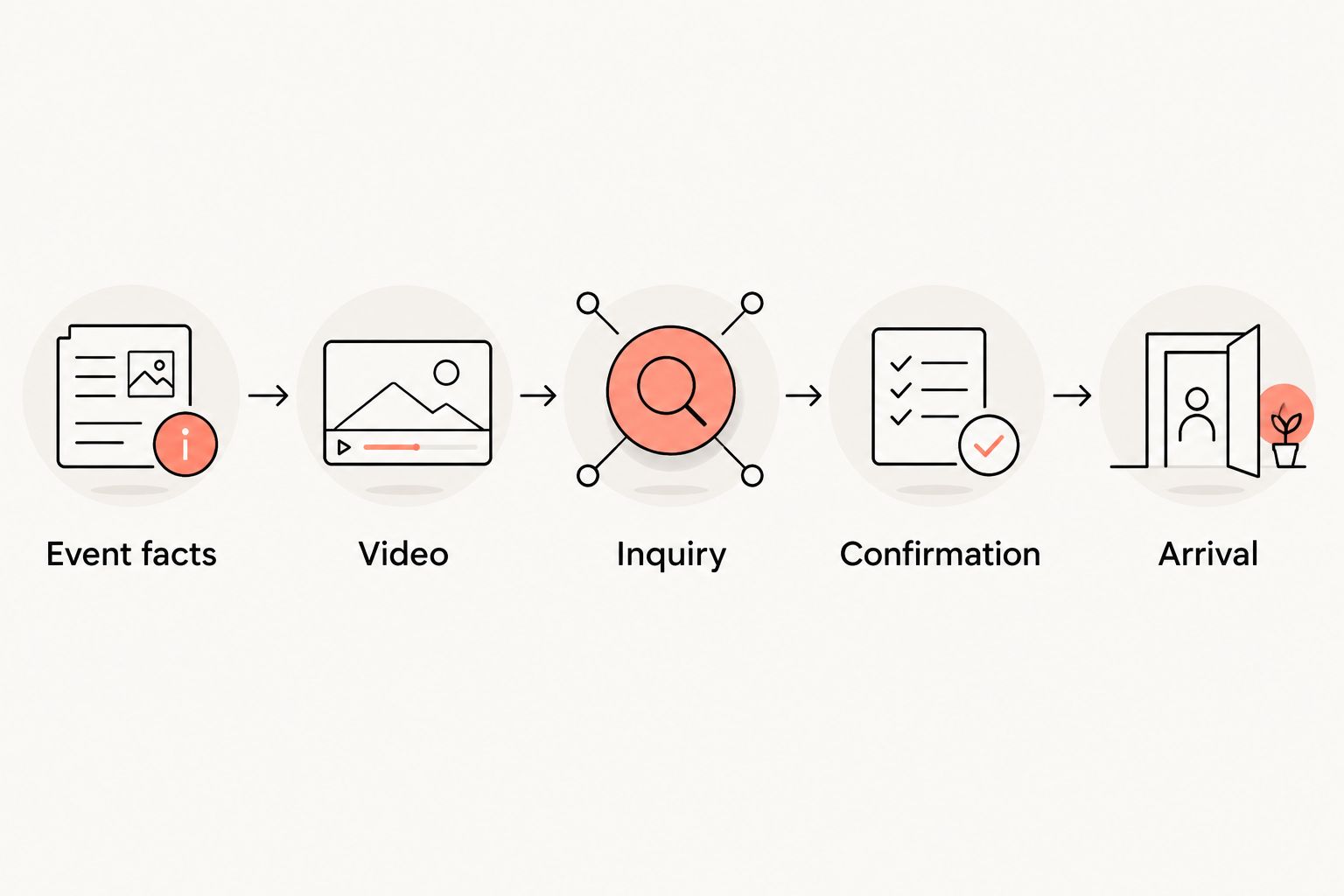
The working sequence is Event facts, Video, Inquiry, Confirmation, and Arrival. Keep that order visible to everyone handling the night.
Arrival tracking configuration
Measure the night at the door, not only on the phone. Keep the record useful for the people serving guests.
Reconcile plans with arrivals
- Ask the floor team which guest reference they can realistically check. Use that reference consistently in the inquiry record and the arrival list.
- Review the event file 24 hours before the event as a suggested planning checkpoint. Resolve unanswered questions, remove canceled arrangements, and verify that the published details still match the approved plan.
- Give the authorized arrival team access to the relevant confirmed records. Do not circulate the full marketing file when a limited guest list will do.
- Mark Arrival recorded only when staff verifies an arrival. Count guests separately from parties; a group inquiry is not a headcount.
- Reconcile the file after the event. Compare attributable inquiries, confirmed parties, and actual guests, retaining the distinction between each measure.
Expected result: The final record shows what happened after the video. It does not turn views into attendance through assumption.
For your 2026 reporting, use separate columns for content activity and venue outcomes. Judge the campaign on verified guest actions, not a full-looking frame.
Second variant: update the campaign when event details change
A recurring DJ night needs a controlled update process. Reusing last week's caption without checking it is not a workflow.
- Ask the event owner to approve the revised facts in the event-information tab before publishing an update.
- Identify every active clip or profile message that contains the changed detail. Where an existing post cannot be corrected cleanly, publish a clear correction and stop directing viewers to the outdated information.
- Contact affected confirmed guests through the approved channel. Do not assume they will see another TikTok post.
- Update the staff response and arrival record together. Record which version of the event information staff communicated.
Expected result: New viewers and already-confirmed guests receive the same current instructions.
For a recurring 2026 series, keep an event-specific record rather than rolling every inquiry into one permanent list. This adds administrative work, but it prevents one night's interest from being treated as another night's attendance.
Best for: Recurring events with a named staff owner. The trade-off is that every changed detail needs a deliberate review; this process does not update itself.
Troubleshooting
Views arrive, but inquiries do not
Watch the post as a first-time viewer. Can you identify the date, location, and next step without guessing?
Fix the missing instruction before producing more footage. If the route works and the message is clear, record the result without inventing a reason for low response.
Guests think a comment confirms their plans
Reply with the approved inquiry instructions and explain that staff must confirm the arrangement separately. Change captions or response wording that blurs that distinction.
Keep New inquiry and Confirmed separate. A heart, reply, or follow is not staff acceptance.
The website field is missing
Stop using instructions that depend on it. Choose another venue-approved contact route, test it from a viewer account, and make the public instructions match that route.
Do not promise that changing an account setting will produce a particular feature. Work with the controls actually present.
The audio or footage cannot be used
Pause publication and replace the disputed material with footage and audio cleared for the intended use. Keep permission records alongside the campaign materials.
Do not repost the same asset repeatedly to work around a restriction.
Inquiries are counted twice
Assign one owner to reconcile records using the minimum necessary guest reference. Preserve the conversation history while consolidating duplicate entries.
Separate party counts from guest counts. Otherwise, a repeat message and a large group can distort the report in different ways.
Customize your workflow
Start with one event and a staff-managed handoff. Add complexity only after the team can consistently distinguish inquiries, confirmations, and arrivals.
For a 2026 campaign, divide responsibilities explicitly: content approval, guest replies, and arrival reconciliation. One person can hold multiple responsibilities, but each task needs a named owner.
If you later connect approved systems, test duplicate handling, failed handoffs, and correction messages before trusting unattended updates. Never let an automation mark an arrangement confirmed unless the underlying venue process authorizes it.
Keep the creative food-forward. Sliceofsociety's New York-style pizza, small plates, cocktails, and DJ entertainment give the campaign a clear subject without invented promotions or claims about particular nights.
FAQ
What's the best workflow from TikTok to sold-out DJ nights?
Connect approved event details to a clear inquiry route, staff confirmation, and verified arrival tracking. Treat a full house as a goal, not a guaranteed result of publishing videos.
Does a TikTok comment count as a reservation?
No, a TikTok comment does not establish a confirmed arrangement. Use the venue's approved process and wait for explicit staff confirmation.
Can TikTok automatically book guests at Sliceofsociety?
This guide does not establish an automatic booking connection for Sliceofsociety. Use the published contact route for inquiries and have authorized staff confirm arrangements separately.
What should a DJ-night video include?
Include the confirmed event date, location context, entertainment details, and one clear next step. Use approved footage and audio cleared for the intended promotional use.
What if my TikTok profile has no website field?
Use another venue-approved contact route that viewers can access. Test the route before publishing and remove instructions that depend on a missing control.
How do I measure whether TikTok brought guests?
Record the source when known, then compare attributable inquiries, confirmations, and verified arrivals. Keep unknown sources separate instead of crediting every guest to TikTok.
How often should I publish DJ-night videos in 2026?
Set a publishing schedule your team can support with accurate details and timely replies. Start with distinct DJ, food-and-music, and practical-planning clips, then assess the guest actions each produces.
One last thing
Before posting another video, ask a colleague to complete the entire guest journey on their own phone. Have them find the event date, follow the inquiry instructions, and explain what would count as confirmation.
If they cannot do that without help, fix the handoff. More views will not repair unclear instructions.